FibreX: What It Is, How It Works, Installation Process, Speed, Availability, and Full Review
- MTN FibreX is MTN Nigeria’s dedicated fiber broadband service designed to provide homes and small offices with fast, stable, and unlimited internet access. While MTN has offered fiber-based broadband for some time, the company has recently accelerated its expansion into more locations across Nigeria.
- This article explains everything you need to know about MTN FibreX: what it is, how installation works, the plans and pricing, availability, router details, performance, and customer service experience. This review is based on real user experience and is not sponsored in any way.
My Personal Experience with MTN Fibre X Rollout:
To properly understand how MTN FibreX works in real life, it helps to look at the timeline of events from installation to activation. This gives insight into how MTN handles customer service, technical challenges, and deployment in new areas.
Timeline of Events from Installation to Activation:
Initial Infrastructure Deployment (April – May 2025)
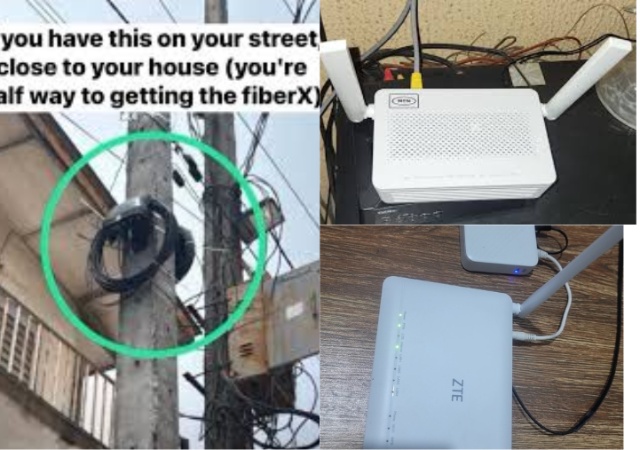
In April 2025, installation of fiber infrastructure began in my area. MTN contractors installed poles along the streets and mounted fiber access devices on them. These poles serve as connection points for homes within the neighborhood.
After noticing the equipment, I contacted MTN customer service and also visited the nearest MTN service center to inquire about subscribing to FibreX. Unfortunately, the staff could not give clear answers regarding when the service would officially go live in my area.
By May, more poles were being installed around the neighborhood. I eventually met a field sales agent and collected his contact details. We stayed in touch, and he assured me he would notify me once the service became active.
Subscription Attempt and Registration Delay (June – July 2025)
In early June, the agent confirmed that the service had gone live. I verified this information with a friend working at an MTN office and proceeded to make payment later in June. The subscription cost for the 50 Mbps plan was ₦25,000.
However, at that time, NIMC (National Identity Management Commission) servers went offline nationwide. Because FibreX registration depends on identity verification, all new activations were placed on hold. This delay was not caused by MTN but by the national system outage.
By late July, the NIMC servers were restored. On July 30th, I finally received my FibreX network ID. The very next morning, I received a call from MTN to schedule installation.
Installation Challenges and Resolution (Late July – Early August 2025)
The initial installation was completed, but unfortunately, it was done incorrectly. The technician lacked the proper tools and technical knowledge to troubleshoot the problem.
On Monday, August 4th, MTN called to activate the service, but activation failed because of the faulty installation. The case was escalated.
The following day, four MTN engineers visited my home to inspect the setup. They identified the error and instructed the original installer to correct it.
By Wednesday afternoon, the problem was fixed. I contacted MTN again for activation, and by around 7:00 pm that same day, the FibreX service became fully operational.
What This Experience Reveals About MTN Customer Service
- The reason for outlining the entire process is to show how MTN handles customer support and technical issues.
- Despite some delays, MTN’s response was impressive. The major challenges encountered were:
- The nationwide NIMC server outage
- Poor workmanship by the outsourced installer
- It is important to note that MTN does not directly employ most installers; installation is outsourced to third-party technicians, which can affect service quality in some cases.
Understanding MTN FibreX Technology What MTN FibreX Actually Is
MTN FibreX is a fiber-to-the-home (FTTH) internet service. A physical fiber cable runs from an access point mounted on a street pole directly into your house and connects to a router.
This means the service does not depend on mobile network signal strength like traditional SIM-based data plans. Advantages and Limitations of Fiber Connection
- Stable and consistent speed
- Not affected by mobile network congestion
- Suitable for streaming, gaming, and remote work
- Unlimited data
- Vulnerable to physical damage (fallen poles, cut cables, storms)
- Availability limited to certain locations
- Installation depends on proper infrastructure
- Installation and Cost Details
- Installation Fees
One of the most attractive features of MTN FibreX is that installation is completely free. Customers only pay for their chosen subscription plan.
For example, I paid ₦25,000 for the 50 Mbps monthly plan and nothing else for equipment or installation.
How the Installation Works
The fiber cable runs from a pole outside your house directly into your home and connects to the router. The installer drills a small hole in the wall to pass the cable inside.
No additional wiring inside the house is usually required unless requested.
Availability of MTN FibreX in Nigeria
States Currently Covered
As of August 8, 2025, MTN FibreX is available in only 14 states:
- Abuja (FCT)
- Akwa Ibom
- Anambra
- Cross River
- Delta
- Edo
- Enugu
- Imo
- Kaduna
- Kwara
- Lagos
- Ogun
- Oyo
- Rivers
MTMTNN is actively expanding its network. Just two months earlier, FibreX was available in only six states.
Area Restrictions
Even within these states, FibreX is limited to specific neighborhoods. Priority is often given to high-density or high-income areas where customer demand is likely to be strong.
How to Check Availability
You can check if FibreX is available in your area using:
The MTN App (select FibreX → New Customer → Choose plan → view locations)
The MTN website FibreX inquiry form
However, availability lists are not always updated. In my case, my street was not listed even though the service was active.
MTN FibreX Plans and Pricing Available Bandwidth Plans
MTN FibreX currently offers five plans based on speed:
- 20 Mbps – ₦15,000 per month
- 50 Mbps – ₦25,000 per month
- 100 Mbps – ₦50,000 per month
- 150 Mbps – ₦60,000 per month
- 300 Mbps – ₦100,000 per month
All plans come with unlimited data usage.
Router and Hardware Information
Router Model Used
The router provided is the ZTE F670L. It is not a high-end router, but it performs its basic function well considering it is supplied free of charge.
Power Requirements
The ZTE F670L does not include a built-in battery. It runs on a 12V 1A power adapter, which means:
- You need stable electricity
- A power bank with 12V output can be used
- A USB-to-12V barrel cable may also work if compatible
- Using backup power is strongly recommended in areas with unstable electricity.
- Router Interface and Features
- The router interface includes:
- Firewall settings
- DNS configuration
- Security controls
- Network management tools
However, it does not display data usage because FibreX is unlimited. Also, the router does not work with ZTE mobile management apps, likely due to MTN firmware customization.
- Speed and Performance Review
Speed Test Results - On the 50 Mbps plan, average test results show:
- Download speed: 47–55 Mbps
- Upload speed: around 25 Mbps
- Ping: under 30 ms
- These results match the advertised speeds.
- Performance During Peak Hours
Even during peak periods between 5 pm and 9 pm, speeds have remained stable. This may be because only a small number of users are currently connected in my area.
Streaming and Heavy Usage
I have successfully streamed 4K movie files of about 8 GB without buffering. The service performs much better than the Airtel 20 Mbps unlimited plan I previously used at ₦30,000 per month.
Speed tests sometimes spike above 100 Mbps before settling at my plan’s cap, suggesting the network can handle higher speeds reliably.
Wi-Fi Range
The router’s 5 GHz network provides full coverage across my apartment without noticeable signal drops.
Is MTN FibreX Truly Unlimited?
- Based on personal use over two weeks:
- No throttling observed
- No speed reduction after heavy downloads
- No downtime experienced
Even when mobile MTN network becomes slow, FibreX remains fast and stable. This confirms that FibreX is a true unlimited broadband service: How to Apply for MTN FibreX
Step-by-Step Process of How to Apply for MTN FibreX
Visit the MTN website and fill out the FibreX inquiry form
- Wait for confirmation that your area is live
- Make payment for your selected plan
- An agent contacts you for installation
- Installation is done free of charge
- Service is activated
10:No money is required for inquiry or inspection, only the subscription fee is paid.
Final Verdict on MTN FibreX
MTN FibreX is a major upgrade for users who need stable, high-speed, and unlimited internet access in Nigeria. While availability is still limited and installation quality depends on third-party technicians, the service itself delivers excellent performance.
For heavy internet users, streamers, gamers, and remote workers, FibreX offers better value than most mobile data plans currently available.
Leave a Reply